In an age where information is power, countless organizations grapple with a common, yet often underestimated, challenge: mountains of legacy documents. These aren't just old paper files; they often exist as vast archives of scanned PDFs, photographs of documents, or even digital files created decades ago without a text layer. While these archives hold invaluable historical records, intellectual property, and critical operational data, their very nature renders them largely inaccessible, akin to finding a needle in an un-indexed haystack. This inaccessibility creates significant hurdles for efficiency, compliance, and, crucially, data privacy. The solution to this modern dilemma lies in a powerful, yet often misunderstood, technology: Optical Character Recognition (OCR).
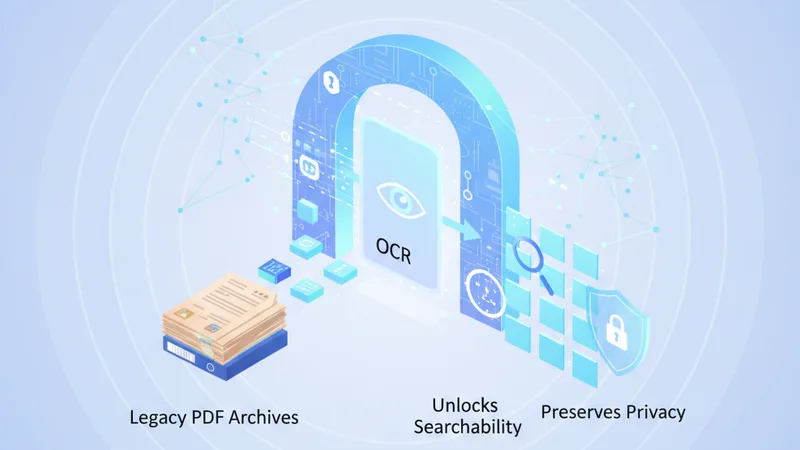
OCR is the digital bridge between static images of text and dynamic, searchable information. It transforms unreadable pixels into editable, searchable characters, effectively digitizing decades of information previously locked away. But beyond unlocking the ability to find a specific word or phrase, OCR plays a pivotal, albeit less publicized, role in fortifying data privacy within these same archives. By enabling precise identification and management of sensitive information, OCR technology empowers organizations to not only harness their historical records but also to protect them rigorously against modern data breaches and regulatory scrutiny.
The Challenge of Legacy PDF Archives: A Silent Data Trap
Many organizations, from governmental bodies and legal firms to healthcare providers and educational institutions, possess extensive collections of legacy documents. These can originate from a variety of sources:
-
Paper Records Digitized Without OCR
Decades of physical archives—contracts, invoices, patient records, academic transcripts—were often scanned into PDF format simply as image files. While this preserved the visual integrity of the original, it created digital photos of documents that computers couldn't "read."
-
Historical Digital Files
Some documents were created digitally in older formats or converted to PDF without retaining the text layer, making them similarly opaque to standard search functions.
-
Handwritten Notes and Specialized Forms
Even modern processes might involve scanning handwritten notes or complex forms where standard text extraction fails.
The implications of such unsearchable archival PDFs are far-reaching:
- Information Silos: Critical data remains isolated, preventing cross-referencing, analysis, and informed decision-making.
- Slow Retrieval and Productivity Loss: Employees waste countless hours manually sifting through documents, hindering workflows and increasing operational costs.
- Compliance Risks: Failing to quickly locate specific information required for audits, legal discovery, or regulatory requests (like GDPR's "right to be forgotten" or HIPAA compliance) can lead to severe penalties.
- Security Vulnerabilities: Without knowing precisely what sensitive information is present and where, organizations cannot adequately protect it. Data breaches become more likely, and remediation is more complex.
- Storage Bloat and Environmental Impact: Large image-only PDFs consume more storage space, and the continued reliance on physical archives contributes to environmental strain.
Understanding OCR Technology: The Digital Alchemist
At its core, OCR technology is about converting different types of documents, such as scanned paper documents, PDFs, or images captured by a digital camera, into editable and searchable data. It's the process that turns a picture of text into actual text.
How OCR Works: A Simplified Overview
- Image Acquisition: The process begins by scanning a physical document or receiving a digital image file (like a PDF containing an image of text).
- Pre-processing: The OCR software enhances the image for better recognition. This can involve de-skewing, de-speckling, rotating, and adjusting brightness/contrast.
- Layout Analysis: The software identifies different elements on the page, distinguishing between text blocks, images, tables, and paragraphs.
- Character Recognition: This is the heart of OCR. The system compares recognized patterns in the image against stored character patterns (matrix matching) or analyzes geometric features of characters (feature extraction). Advanced OCR uses AI and machine learning to improve accuracy.
- Post-processing and Output: Once characters are recognized, they are assembled into words, sentences, and paragraphs. The output is typically a text layer embedded within the original PDF, creating a searchable PDF. Other outputs can include editable document formats (like .docx) or plain text files.
The result is a "searchable PDF" – a document that looks identical to the original scanned image but now has an invisible text layer underneath. This layer is what search engines and PDF readers interact with, enabling functions like copying text, highlighting, and, most importantly, searching.
OCR as the Key to Searchability: Unlocking Hidden Value
The most immediate and apparent benefit of applying OCR to archival PDFs is the transformation of static images into dynamic, searchable documents. This shift is revolutionary for any organization dealing with large volumes of information.
-
Instant Information Retrieval
No more manual sifting. With searchable PDFs, users can find specific keywords, phrases, names, or dates across an entire archive in seconds. This capability is invaluable for legal discovery, academic research, historical analysis, or simply locating a crucial clause in an old contract.
-
Enhanced Productivity and Efficiency
Time saved on document search translates directly into increased productivity. Employees can focus on analysis and decision-making rather than rudimentary information retrieval. Workflows become smoother, and response times to inquiries drastically improve.
-
Improved Data Analysis and Insights
Once documents are searchable, their content can be aggregated and analyzed using advanced tools. This allows organizations to uncover trends, identify patterns, and extract valuable insights that were previously hidden within inaccessible data.
-
Meeting Compliance and Audit Requirements
For industries with strict regulatory frameworks, the ability to quickly produce specific documents or information upon request is paramount. OCR ensures that even legacy documents can meet these demands, mitigating the risk of non-compliance fines and legal ramifications. Whether it's proving due diligence or providing evidence, searchable archival PDFs are essential.
-
Better Collaboration and Accessibility
Searchable PDFs are easier to share, annotate, and collaborate on. They also improve accessibility for individuals using screen readers or other assistive technologies, promoting inclusivity within the organization.
OCR and Data Privacy: An Unsung Hero for Secure Document Management
While searchability is the headliner, OCR's role in bolstering data privacy and secure document management is equally, if not more, critical in today's regulatory landscape. It transforms privacy from a reactive, manual effort into a proactive, automated, and precise process.
Redaction: Precise Protection of Sensitive Information
One of the most powerful privacy applications of OCR lies in its ability to facilitate redaction. Once a document is OCR'd, its text layer allows for the precise identification of sensitive data, such as:
- Personal Identifiable Information (PII): Names, addresses, social security numbers, dates of birth.
- Protected Health Information (PHI): Medical records, diagnoses, treatment plans.
- Financial data: Account numbers, credit card details.
- Confidential business information: Trade secrets, proprietary formulas, legal strategies.
With a searchable PDF, automated tools can scan for specific patterns (e.g., regex for SSNs) or keywords and then apply permanent redaction, making the underlying text irretrievable. Without OCR, redaction on image-only PDFs would be a laborious, error-prone manual process, often involving physically covering text or using digital "whiteout" that doesn't truly remove the data. Browser-based tools, like those offered by ContinuePDF, provide user-friendly interfaces to perform these critical redactions efficiently and securely, ensuring sensitive data never leaves your environment.
Enhanced Access Control and Data Minimization
OCR enables better categorization and tagging of documents based on their content. This allows organizations to implement granular access controls, ensuring that only authorized personnel can view specific types of information. Furthermore, by making content discoverable, OCR helps in data minimization efforts. Organizations can identify and securely delete obsolete or irrelevant sensitive data, reducing their data footprint and thus the risk associated with it, aligning with principles like GDPR's "storage limitation."
Meeting Regulatory Compliance with Confidence
Regulations such as GDPR, HIPAA, CCPA, and various industry-specific standards mandate stringent requirements for data protection and access. OCR empowers organizations to:
- Respond to Data Subject Access Requests (DSARs): Quickly locate all personal data pertaining to an individual.
- Implement "Right to Be Forgotten": Identify and redact or delete relevant information efficiently.
- Prove Compliance: Generate auditable records of data processing and protection efforts.
By transforming legacy documents into a manageable and transparent format, OCR significantly simplifies the arduous task of demonstrating compliance and proactively mitigating risks.
Improved Version Control and Audit Trails
When sensitive documents are updated or redacted, OCR'd versions allow for clear version control, tracking changes and ensuring that only the most current, compliant, and properly redacted versions are in circulation. This creates robust audit trails, critical for accountability and regulatory transparency.
Practical Guide: Digitizing Your Legacy Archives with OCR
Transforming a collection of physical or image-only legacy documents into a fully searchable, privacy-compliant digital archive is a multi-step process. Here’s a practical guide to get started:
Step 1: Assessment and Planning
- Inventory: Understand the scope. How many documents? What types? Where are they stored?
- Prioritize: Identify the most critical documents first (e.g., legal, financial, HR records) based on business impact, legal requirements, and frequency of access.
- Define Goals: Clearly articulate what you want to achieve – e.g., "reduce document retrieval time by 50%" or "become HIPAA compliant for all legacy patient records."
- Budget and Resources: Allocate necessary funds, personnel, and time.
Step 2: Document Preparation
This crucial step ensures high-quality OCR results.
- Cleaning: Remove dust, debris, and any foreign objects from documents.
- Unbinding/Unstapling: Prepare documents for flatbed or sheet-fed scanning.
- Sorting and Organization: Group similar documents together. Consider implementing a consistent naming convention for digital files before scanning.
- Repair: Mend torn pages or reinforce fragile documents.
Step 3: High-Quality Scanning
The quality of the initial scan directly impacts OCR accuracy. Invest in good scanners and settings.
- Resolution: Scan at a minimum of 300 DPI (dots per inch) for optimal OCR performance. Higher resolutions (e.g., 600 DPI) can be beneficial for very old or fine-print documents.
- Color Mode: While black and white is sufficient for most text, color scanning might be necessary for documents with color-coded information, stamps, or significant graphical elements.
- Orientation: Ensure documents are scanned upright. Auto-orientation features in modern scanners can help.
- Batch Scanning: Utilize scanners with automatic document feeders (ADF) for large volumes.
Step 4: Implementing OCR
Once scanned images are digital, it’s time to apply OCR.
- Choose Your Tool: Select an OCR solution that fits your needs. This could be dedicated OCR software, an integrated feature within your document management system (DMS), or a convenient browser-based tool like ContinuePDF. Browser-based solutions often offer the benefit of processing files without uploading them to external servers, enhancing data privacy.
- Process Documents: Feed your scanned image PDFs into the OCR software. For batch processing, ensure the software can handle multiple files simultaneously.
- Language Settings: Configure the OCR engine for the correct language(s) of your documents to maximize accuracy.
Step 5: Verification and Quality Control
OCR is highly accurate but not 100% perfect, especially with poor-quality originals.
- Spot Checking: Manually review a representative sample of OCR'd documents to identify common errors.
- Proofreading: For highly critical documents (e.g., legal contracts), consider a more thorough proofreading of the OCR-generated text layer.
- Correction: Many OCR tools allow for manual correction of recognized text without altering the original image.
Step 6: Secure Storage and Management
Once OCR'd and verified, these searchable PDFs need to be stored and managed securely.
- Centralized Repository: Store documents in a robust Document Management System (DMS) or secure cloud storage.
- Backup and Recovery: Implement regular backup routines and a disaster recovery plan.
- Encryption: Encrypt your documents at rest and in transit. Tools like ContinuePDF's encryption features can help secure sensitive files.
- Compression: To optimize storage and bandwidth, consider compressing your PDFs. ContinuePDF's compression tools can significantly reduce file sizes without compromising quality.
- Access Control: Apply strict access permissions based on roles and responsibilities.
Choosing the Right OCR Solution for Your Needs
Selecting the appropriate OCR technology is crucial for a successful digitization project. Consider the following factors:
- Accuracy: Look for solutions with high recognition rates, especially for your specific document types and languages.
- Language Support: Ensure the OCR engine supports all languages present in your archives.
- Batch Processing: For large archives, the ability to process thousands of pages automatically is essential.
- Integration: Can the OCR solution integrate with your existing DMS, CRM, or other business applications?
- Security and Privacy: For sensitive data, prioritize solutions that offer robust security features, data residency options, and, ideally, client-side processing for enhanced privacy. ContinuePDF, for instance, offers browser-based OCR where your documents are processed locally, ensuring they never leave your device. This is a critical privacy advantage, especially for organizations handling highly confidential information.
- Ease of Use: An intuitive interface can reduce training time and improve user adoption.
- Scalability: Can the solution grow with your organization's needs?
- Cost: Evaluate pricing models—per-page, subscription, or one-time license—against your budget.
Overcoming Common OCR Challenges
While OCR technology is powerful, it's not without its challenges:
- Low-Quality Originals: Poor scans, faded ink, crumpled pages, or excessive bleed-through can significantly reduce accuracy.
- Mitigation: Invest in high-quality scanners, perform thorough document preparation, and use OCR software with advanced image pre-processing capabilities.
- Handwriting: Machine OCR for handwritten text is significantly less accurate than for typed text, though improvements are ongoing.
- Mitigation: For critical handwritten documents, a combination of OCR and manual data entry or verification is often necessary.
- Complex Layouts: Documents with multiple columns, mixed text and images, tables, or non-standard fonts can confuse OCR engines.
- Mitigation: Choose OCR software with sophisticated layout analysis and template-based processing if dealing with highly structured but complex forms.
- Foreign Languages and Specialized Characters: Ensuring the OCR engine has the correct language packs installed is vital.
- Mitigation: Verify language support and accuracy for all relevant languages during solution selection.
The Future of Archival Management with OCR
The journey of OCR is far from over. Ongoing advancements in artificial intelligence and machine learning are continually enhancing its capabilities. Future iterations will likely feature even higher accuracy rates, better handling of complex and handwritten documents, and seamless integration with intelligent document processing (IDP) systems. These IDP systems will not only OCR documents but also understand their content, extract specific data points, and automate workflows based on that understanding, ushering in an era of truly intelligent archival management.
Actionable Takeaways
- Prioritize Digitization: Don't let legacy documents be a drag on efficiency or a privacy risk.
- Invest in Quality: High-quality scans are the foundation of effective OCR.
- Choose Wisely: Select an OCR solution that balances accuracy, features, and crucially, data privacy protection. Consider browser-based tools for client-side processing of sensitive data.
- Embrace OCR for More Than Search: Recognize its vital role in enabling precise data redaction, access control, and regulatory compliance.
- Implement a Secure DMS: Ensure your OCR'd documents are stored, managed, and backed up in a secure, compliant system, utilizing tools for encryption and compression where appropriate.
- Regularly Review: Periodically audit your digitized archives and OCR processes to maintain accuracy and compliance.